
After ten years use the battery in all our heat cost allocating meters died. At the same time, there was a new obligation to have a remotely read hot water meters. Thus our housing association bought new radiator and wather meters with the remote reading feature. And I got idea: could it be connected to my home automation system?
Receiving
From the device documentation I discovered that measured values are transmitted over a wmbus protocol. It's a battery saving protocol for sending short messages over a license free band. Our meters are transmitting on a frequency 868.950Mhz.
Having this specification, I was looking for some hardware. I was sure there must be an Arduino module of some kind, that could be hooked to a processor from ESP family. And in the best scenario, the module would be supported in ESP Home firmware.
And I was lucky. There really is such module, it's called CC1101. It doesn't have direct support in ESP Home, but I found an internet user,
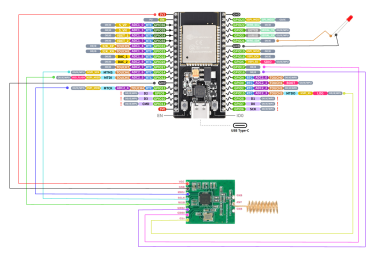
So I bought the radio module, the Nodemcu-32S development board, connected it all together, loaded ESP Home with that plugin and a basic configuration, and voilà. It works! I now see all the received messages in the log.
Parsing
Next step is to retrieve measured values and send it to Home assistant. The wmbus plugin uses wmbusmeters library to parse messages. The library has a useful website https://wmbusmeters.org, where a received datagram from the log can be pasted and it will tell you what data it contains.
For ESP Home to parse datagrams, a batch of "sensors" needs to be configured. Each sensor needs the following:
Device ID
Every message contains an identification number of the transmitting meter. This is easy, each meter has it's id printed on the body, so I could easily identify which messages carries data measured in my apartment.
Key
Every message contains the mentioned ID, meter type (water, heat cost allocator, ...) and several other metadata. Then there are all the measured values, but these are encrypted. Here I was lucky, as our housing association gave me encryption keys of meters installed in my apartment.
Driver
Every meter manufacturer uses slightly different format of measured values. That means a manufacturer and also a specific version of the meter must be obtained somehow. I simply couldn't find such detailed specification for our installed meters. It's branded by some local distributor, but who actually makes the chip inside can't be found anywhere. But knowing the key for the encrypted messages, the web wmbusmeters.org can in the "auto" mode recognize the proper driver for parsing measured values.
Out meters are some newer model of "hydroclima" device. It has the best match, but it still can't decode all values. But the important values of current heat consumption is decoded just fine.
Result
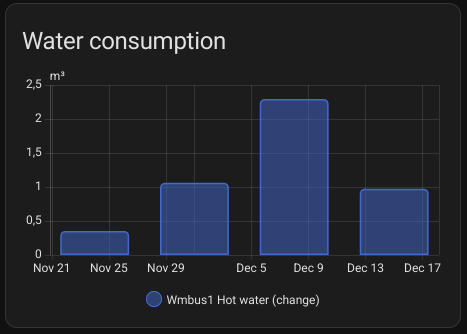
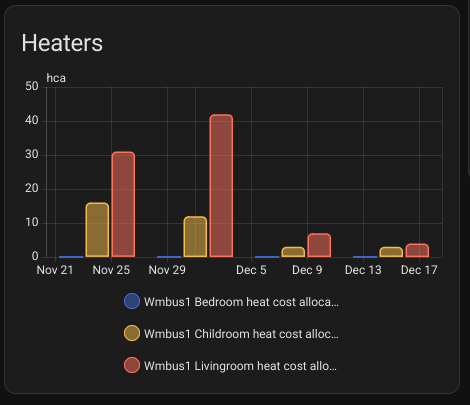
Measured values are showing up in Home assistent. Success. For a while I had to find the proper place for my receiver hardware to have good reception signal for all transmitting meters. I also discovered, that meters are saving energy, so they transmit values only on working days between 8 and 18 hours, so collected values are not as continuous as it would be without this transmitting plan. But besides that it works well.
Resulting ESP Home configuration looks like the following:
substitutions:
  id: wmbus1

esphome:
  name: wmbus1

esp32:
  board: nodemcu-32s

wifi:
  ssid: !secret iot_wifi_ssid
  password: !secret iot_wifi_password

api:
  encryption:
    key: !secret wmbus1_api_key

ota:
  - platform: esphome
    password: !secret wmbus1_ota_password

logger:

status_led:
  pin: GPIO2

time:
  - platform: sntp
    id: time_sntp

button:
  - platform: restart
    internal: True
    id: reset_button
    name: "Reset button"

external_components:
  - source: github://SzczepanLeon/esphome-components@version_4
    refresh: 0d
    components: [ wmbus ]

wmbus:
  frequency: 868.950
  mosi_pin: GPIO13
  miso_pin: GPIO12
  clk_pin:  GPIO14
  cs_pin:   GPIO15
  gdo0_pin: GPIO17
  gdo2_pin: GPIO16

  led_pin: GPIO21

  sync_mode: false
  all_drivers: false
  log_all: true

sensor:
  - platform: wmbus
    meter_id: 0x24334557
    key: !secret wmbus1_key_24334557
    type: "iwmtx5"
    sensors:
      - field: "total"
        name: Hot water
        unit_of_measurement: "m³"
        icon: "mdi:water-thermometer"
        accuracy_decimals: 3
        state_class: total_increasing
        device_class: volume
      - field: "rssi"
        name: "Hot water RSSi"
        unit_of_measurement: "dBm"
        accuracy_decimals: 0
        device_class: "signal_strength"
        state_class: "measurement"
        entity_category: "diagnostic"
  - platform: wmbus
    meter_id: 0x93098480
    key: !secret wmbus1_key_93098480
    type: "hydroclima"
    sensors:
      - field: "current_consumption"
        name: Bedroom heat cost allocator
        unit_of_measurement: "hca"
        icon: "mdi:radiator"
        state_class: total_increasing
        accuracy_decimals: 0
      - field: "rssi"
        name: "Bedroom heat cost allocator RSSi"
        unit_of_measurement: "dBm"
        accuracy_decimals: 0
        device_class: "signal_strength"
        state_class: "measurement"
        entity_category: "diagnostic"
  - platform: wmbus
    meter_id: 0x93098479
    key: !secret wmbus1_key_93098479
    type: "hydroclima"
    sensors:
      - field: "current_consumption"
        name: Childroom heat cost allocator
        unit_of_measurement: "hca"
        icon: "mdi:radiator"
        state_class: total_increasing
        accuracy_decimals: 0
      - field: "rssi"
        name: "Childroom heat cost allocator RSSi"
        unit_of_measurement: "dBm"
        accuracy_decimals: 0
        device_class: "signal_strength"
        state_class: "measurement"
        entity_category: "diagnostic"
  - platform: wmbus
    meter_id: 0x93098478
    key: !secret wmbus1_key_93098478
    type: "hydroclima"
    sensors:
      - field: "current_consumption"
        name: Livingroom heat cost allocator
        unit_of_measurement: "hca"
        icon: "mdi:radiator"
        state_class: total_increasing
        accuracy_decimals: 0
      - field: "rssi"
        name: "Livingroom heat cost allocator RSSi"
        unit_of_measurement: "dBm"
        accuracy_decimals: 0
        device_class: "signal_strength"
        state_class: "measurement"
        entity_category: "diagnostic"